How to Use an Oral-B Electric Toothbrush
To use an Oral-B electric toothbrush, wet the head, add toothpaste, select a mode, guide the round head tooth by tooth, and let the timer pace your brushing. Use light pressure, cover every mouth area, rinse the head, and charge the handle when needed.
On this page (10 sections)
- How do you prepare an Oral-B electric toothbrush?
- Which Oral-B mode should you use?
- How should you hold and move the brush head?
- How do you brush every area of your mouth?
- What does the pressure sensor mean?
- How do you use the timer and display?
- How do you clean the brush head after brushing?
- How do you charge an Oral-B electric toothbrush?
- Can seniors use an Oral-B electric toothbrush?
- What is the easiest routine to follow every day?
To use an Oral-B electric toothbrush, wet the brush head, apply toothpaste, choose a comfortable mode, and guide the round head slowly across each tooth. Use light pressure and cover every section of your mouth, allowing the timer or coaching features to pace the session.
Hold the handle lightly, keep the head along the teeth and gumline, and follow the same pattern each time so you do not rush the back teeth.
How do you prepare an Oral-B electric toothbrush?
Attach a compatible brush head, wet the bristles, and add toothpaste before turning on the handle. Keep the brush over the sink because powered bristles can spread toothpaste when the motor starts.
Choose a mode that suits your mouth. Daily Clean is a practical starting point, while Sensitive is gentler when regular brushing feels too strong.
Place the head against your teeth before pressing the power button. A round Oral-B iO head works on one tooth area at a time, so guide it with small movements instead of scrubbing rapidly.
Keep your grip relaxed. This makes it easier to respond when the pressure sensor signals that you are pressing too hard.
Which Oral-B mode should you use?
Choose Daily Clean for regular brushing, Sensitive for a softer feel, and a special mode when it matches your routine. The best mode lets you clean thoroughly without forcing the brush against your teeth.
The Oral-B iO9 has 7 smart settings: Smart Adapt, Daily Clean, Sensitive, Whitening, Gum Care, Intense, and Tongue Clean. Its color display shows brushing updates.
The Oral-B iO Series 8 has 6 cleaning modes and a colored interactive display. Its 2-minute quadrant timer pulses every 30 seconds.
Use Whitening for a routine focused on surface stains, not as a reason to press harder. Gum Care or Sensitive can suit a less forceful routine, while Tongue Clean is available on the iO9.
How does the Oral-B iO9 help you choose a mode?
The Oral-B iO9 suits people who want 7 settings and an interactive color display on the handle.
Its iO Sense smart charger provides live coaching for all 6 brushing zones. The handle also gives brushing updates and indicates when the brush head needs replacement.
How should you hold and move the brush head?
Place the round head against one tooth or a small group of surfaces, then guide it slowly without scrubbing. Cover the outer, inner, and chewing surfaces before moving on.
Start at the back of one side and work toward the front, then repeat on the other side. Keep the bristles where the teeth meet the gums, using gentle contact.
The pressure sensor helps you notice when your force is too high, too low, or right on supported models. Let the head rest on the surface rather than pushing into the gumline.
Both the Oral-B iO9 and iO Series 8 combine round heads with micro-vibrating bristles, so controlled guiding works better than manual-style scrubbing.
How do you brush every area of your mouth?
Divide your mouth into 4 sections and spend about 30 seconds on each one. Cover the outside, inside, and chewing surfaces within every section.
Begin with the outside surfaces, including the back molars. Then clean the inside surfaces, tilting the handle slightly where space is narrow.
Finish with the chewing surfaces and the grooves of the back teeth.
The Oral-B iO9's iO Sense smart charger coaches across all 6 brushing zones. The Oral-B iO Series 8 uses 30-second pulses through its 2-minute quadrant timer.
For a broader look at handle choices, compare the best Oral-B iO toothbrush options before choosing a model.
What does the pressure sensor mean?
The pressure sensor tells you to adjust force, so ease your hand instead of pushing through the signal. Extra force can make a powered brush feel harsher.
On the Oral-B iO9, the sensor lights up when you brush too hard. The Oral-B iO Series 8 signals when you brush too hard, too softly, or just right.
If the signal shows excessive pressure, loosen your grip and let the head sit more lightly on the tooth. If it indicates too little pressure, guide the head into contact without pressing down.
Slow movement and steady contact are more useful than extra force around the gumline.
What should you do if the brush feels too strong?
Select Sensitive if your handle includes it, lower your pressure, and move the head more slowly. The Oral-B iO9 includes Sensitive and Gum Care modes, while the Oral-B iO Series 8 includes 6 cleaning modes.
If brushing causes ongoing pain or bleeding, speak with a dental professional. Do not brush through discomfort.
How do you use the timer and display?
Use the timer as a pacing tool, not as a reason to stop before every area is covered. A complete session includes all 4 mouth sections.
The Oral-B iO Series 8's quadrant timer pulses every 30 seconds during a 2-minute session. Treat each pulse as a prompt to move to the next quarter of your mouth.
The Oral-B iO9 uses an interactive color display for updates, while its iO Sense smart charger provides live coaching for all 6 brushing zones.
Keep the head positioned along the teeth and gumline instead of watching the screen throughout brushing.
Read what Oral-B iO toothbrush lights mean if a color or display message changes during use.
How do you clean the brush head after brushing?
Rinse the brush head under running water, switch off the handle, and store the head where it can dry between uses. Shake off excess water and wipe the handle if foam collects around the top.
Rinse from several angles so toothpaste leaves the bristles and the area where the head joins the handle. Do not share a brush head.
Replace an Oral-B iO head every 3 months or sooner when the bristles become worn.
Which replacement head fits an Oral-B iO handle?
The Oral-B iO Ultimate Clean Heads, 4-Pack fits Oral-B iO Series electric toothbrush handles only. It includes 4 genuine Oral-B iO Ultimate Clean replacement heads.
Use one head at a time and replace it after about 3 months or sooner if the bristles wear.
How do you charge an Oral-B electric toothbrush?
Place the handle on its charger after brushing or whenever the battery needs power, and keep the charging area dry. A regular charging habit helps prevent interruptions.
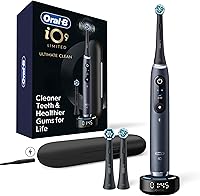
The Oral-B iO9 includes an iO Sense smart charger and a charging travel case. The charger provides coaching across all 6 brushing zones.
The Oral-B iO Series 8 is rechargeable and includes a travel case. Keep its charger in a stable location away from water.
Do not brush while the handle is connected to a charger. Remove it first, then wet the head and apply toothpaste.
For travel, let the head dry before closing it in a case.
Can seniors use an Oral-B electric toothbrush?
Yes, an Oral-B electric toothbrush can suit seniors who want a timed routine and pressure guidance. A light grip, slow movement, and a comfortable mode matter more than extra force.
The Oral-B iO Series 8 gives feedback for too hard, too soft, and just right. The Oral-B iO9 adds 7 settings, a color display, and live coaching through its iO Sense smart charger.
Choose the handle that matches the person's comfort with displays and settings. Our guide to the best electric toothbrushes for seniors covers features that can make a powered routine easier to manage.
What is the easiest routine to follow every day?
Use the same 4-section pattern, light pressure, and 2-minute timer at every session. Start with a clean head, select a comfortable mode, and guide the brush across the outside, inside, and chewing surfaces.
Pick the Oral-B iO9 for 7 settings, an interactive color display, live charger coaching, and a travel case. Choose the Oral-B iO Series 8 for its 6 modes, pressure guidance, display, timer, and travel case.
Keep the Oral-B iO Ultimate Clean Heads, 4-Pack for scheduled changes on an iO handle. For a broader comparison, Aquasonic vs Oral-B explains the main choice.
The key to how to use oral b electric toothbrush routines is steady coverage, not extra pressure. Wet the head, use a small amount of toothpaste, follow the timer, rinse the head, and replace it every 3 months or sooner when worn.
Frequently asked questions
Should you move an Oral-B electric toothbrush back and forth?
Guide the round head slowly from tooth to tooth instead of scrubbing rapidly across several teeth. Let the powered bristles do the cleaning while you keep the head positioned along the tooth surface and gumline.
Can you use an Oral-B electric toothbrush with braces?
An electric toothbrush can clean around braces, but brackets and wires need careful attention. Use light pressure and follow the cleaning advice from your orthodontic team for your specific appliance.
How often should you replace an Oral-B iO brush head?
Replace an Oral-B iO brush head every 3 months or sooner when it becomes worn. The Oral-B iO Ultimate Clean Heads, 4-Pack gives you 4 compatible replacement heads for planned changes.