8 Best Electric Toothbrushes for Seniors (October 2026)
The best electric toothbrushes for seniors and older hands include the Sonicare 5300 for flexible routines, the Oral-B iO Series 3 for pressure guidance, and the Sonicare 4200 for gradual starts.
On this page (8 sections)
- Best electric toothbrush for seniors by need
- What makes a toothbrush easier for older hands?
- Which toothbrush features should seniors compare first?
- How should you choose an electric toothbrush for arthritic hands?
- How do you set up and care for a new electric toothbrush?
- What common electric toothbrush mistakes should you avoid?
- How did we compare these electric toothbrushes for seniors?
- Which electric toothbrush should seniors choose?
The Sonicare 5300 is the best electric toothbrush for seniors who want pressure feedback and flexible settings. For simpler operation, choose the Oral-B iO Simple Clean; for a gradual introduction to electric brushing, consider the Sonicare 4200.
Hand comfort is personal, so use the features as a shortlist, not a guarantee that one brush will suit every hand. A manageable grip, clear feedback and a charging setup you can handle may matter more than a long list of modes.
Our picks at a glance
-
1

-
2

-
3

Best electric toothbrush for seniors by need
The Sonicare 5300 is the strongest all-around choice here for someone who wants a pressure signal, several brushing options and a travel case. The other picks focus on one-touch operation, visible alerts, gentler starts, long battery life or charging convenience.
Sonicare 5300: Best for flexible routines
- Pressure sensor
- 3 brushing modes
- 3 intensity settings
- Up to 2 weeks per charge
- Travel case
Three modes and three intensity settings give you several ways to adjust brushing. A pressure sensor, timer and travel case add useful reminders and convenience.
Pros
- Pressure sensor
- Three modes and three intensity settings
- Travel case included
Cons
- More settings to choose from
- Charger needs a place to stay
The Sonicare 5300 suits someone who wants a choice of brushing styles and reminders. Its pressure sensor, modes and intensity settings let you adjust the routine, while the Smartimer and QuadPacer help pace a 2-minute session.
Clean, White and Gum Care cover standard brushing, surface stain removal and a gum-care routine. BrushSync reminds you when it is time to replace the head, which is useful if you do not want to track its age yourself.
The package includes a G2 Optimal Gum Care head, 2 DiamondClean heads, a charger and a travel case. It provides up to 2 weeks of use per charge.
Choose it if you want several ways to adjust your brushing and a reminder for head replacement. Skip it if selecting among modes and intensity levels would make your routine harder, or if you want a particularly simple one-button start.
Oral-B iO Series 3: Best for pressure guidance
- Smart pressure sensor
- 3 cleaning modes
- 2-minute light ring timer
- 30-second quadrant prompts
- Travel case
The pressure sensor alerts you when you press too hard, and its light ring marks brushing time. Its 3 modes include Sensitive for a gentler setting.
Pros
- Pressure alerts
- Light ring timer
- Two brush heads and travel case included
Cons
- Three modes still require a choice
- Round head shape may feel different from a manual brush
The Oral-B iO Series 3 is a strong choice if you want clear pressure feedback and a timer you can see. Its smart sensor alerts you when you press too hard, and the light ring marks the 2-minute brushing time with prompts for each quadrant.
Choose among Daily Clean, Sensitive and Whitening. The round brush head and gentle micro-vibrations may feel different from a rectangular manual brush, so head shape is worth considering if you have a firm preference.
Two replacement heads and a travel case come with it. The refill change alert indicates when it is time to replace a brush head.
Pick this model if pressure guidance is high on your list and you are comfortable choosing among 3 modes. Skip it if you want a single start setting with minimal choices, or if a round head feels unfamiliar; the iO Simple Clean starts on super-sensitive.
Sonicare 4200: Best for gradual starts
- Pressure sensor
- 3 intensity settings
- Easy Start
- Up to 14 days per charge
- Travel case
The 4200 offers 3 intensity levels and gradually raises brushing power over the first 14 cleans with Easy Start. Its pressure sensor signals when to ease off.
Pros
- Low, medium and high intensity
- Easy Start for the first 14 cleans
- Travel case included
Cons
- Power adaptor not included
- One brush head included
The Sonicare 4200 keeps its adjustment to 3 intensity levels: High, Medium and Low. Its pressure sensor signals excessive pressure with gentle vibrations, and Easy Start gradually increases brushing power over the first 14 cleans.
A 2-minute SmartTimer and 30-second QuadPacer help divide brushing into sections. Its battery provides up to 14 days of regular brushing per charge, and the set includes a travel case.
The charger is included, but the power adaptor is not. Check that you have a suitable power source before setting up a charging spot.
Choose the 4200 if you want an electric brush that eases in gradually and lets you adjust intensity without choosing among named modes. Skip it if you need the power adaptor in the box, or if having only 1 included brush head is inconvenient.
Sonicare ProtectiveClean 6500: Best for charging trips

- Pressure sensor reduces vibration when you press too hard
- 3 modes
- 3 intensity levels
- Up to 14 days per charge
- USB charging travel case
The pressure sensor warns you and reduces vibration when you press too hard. The charging travel case can suit a routine that includes trips.
Pros
- Charging travel case included
- Pressure sensor adjusts vibration
- Three modes and intensity levels
Cons
- More settings than a basic routine needs
- Charging case requires its own USB power connection
The Sonicare ProtectiveClean 6500 combines a pressure sensor with 3 modes and 3 intensity levels. When you press too hard, it warns you and reduces the toothbrush vibrations.
Its charging travel case is the main reason to consider it over simpler options. The set includes 2 W2 DiamondClean brush heads, a charger and the USB charging case, while the battery provides up to 14 days of regular use.
BrushSync recognizes the type of head and adjusts intensity, then reminds you when a replacement is due. That can help if you prefer a cue instead of tracking head age yourself.
Choose this model if you travel and want the case to charge the brush, or if you value several brushing adjustments. Skip it if your routine rarely involves trips and the extra settings would go unused; the Sonicare 4200 offers a more focused intensity choice.
Oral-B iO Simple Clean: Best for one-touch starts

- One-touch button
- Starts on super-sensitive setting
- Automatic pressure sensor
- 3 cleaning settings
- 2-minute timer with 30-second prompts
A one-touch button and a start on the super-sensitive setting keep the first steps simple. Its pressure sensor slows the brush and signals red when you press too hard.
Pros
- One-touch button
- Starts on super-sensitive
- Automatic pressure sensor
Cons
- Three settings still require a choice
- Replacement heads need to be iO compatible
The Oral-B iO Simple Clean is the most straightforward pick here for button operation. It has a one-touch button and starts on the super-sensitive setting, so you can begin without first choosing a mode.
The automatic pressure sensor slows the brush and signals red when you press too hard. Its 3 settings are super-sensitive, gentle and daily clean, with a 2-minute timer that alerts you every 30 seconds to change zones.
A travel case is included, and the handle has a low-charge indicator. It fits Oral-B iO replacement heads, so check that the head type suits your routine.
Choose it if you value a simple start and pressure feedback. Skip it if you want a brush with no mode choices after starting, or if you already have non-iO Oral-B heads you want to keep using.
Oral-B Smart 1500: Best for visible alerts

- 360-degree visible pressure control
- Sensitive mode
- 4 cleaning modes
- 30-second quadrant timer
A visible pressure control lights up when you brush too hard. The handle timer prompts you to move to a new area every 30 seconds.
Pros
- Visible pressure warning
- Sensitive mode
- Quadrant timer
Cons
- Four modes may be more than you need
- Travel case is not included
The Oral-B Smart 1500 makes its pressure warning easy to spot: a 360-degree control lights up when you brush too hard. It also has a sensitive mode and a quadrant timer that prompts you to move every 30 seconds.
It has 4 cleaning modes, so it offers more choice than the one-button model. The round Oral-B head is another difference from the elongated shape common on manual brushes.
Consider it if a visible pressure warning matters more than having a travel case in the box. Check replacement head compatibility before choosing a head for sensitive brushing.
Choose this model if a light-based warning and timed prompts are your priorities. Skip it if you need a travel case included or prefer a very simple control scheme.
SURI Core Sonic: Best for lighter handling

- Lightweight design
- Haptic pressure sensor
- Gentle mode
- Up to 4 weeks per charge
- USB-C charging
SURI describes Core as lightweight and includes a haptic pressure sensor and Gentle mode. Its stated battery life is up to 4 weeks per charge.
Pros
- Lightweight design
- Gentle mode and haptic pressure sensor
- Long stated battery life
Cons
- Charging uses a wireless induction pebble
- Travel cap is not a protective case
SURI describes its Core Sonic as lightweight, which may appeal if handle weight is a concern. It also has a haptic pressure sensor, a Gentle mode and a 2-minute timer.
Its battery provides up to 4 weeks of use per charge, and charging uses USB-C with a wireless induction pebble. Its plant-based travel cap and button lock are useful for packing, though the cap is not described as a full travel case.
Core has a slim, oblong head shape rather than a round one. That can be a deciding factor if you already know which head shape feels more familiar.
Choose it if a lightweight design, Gentle mode and less frequent charging appeal to you. Skip it if you need a charging dock that plugs directly into a wall outlet or want a protective travel case.
Aquasonic Black Series PRO: Best for spare heads
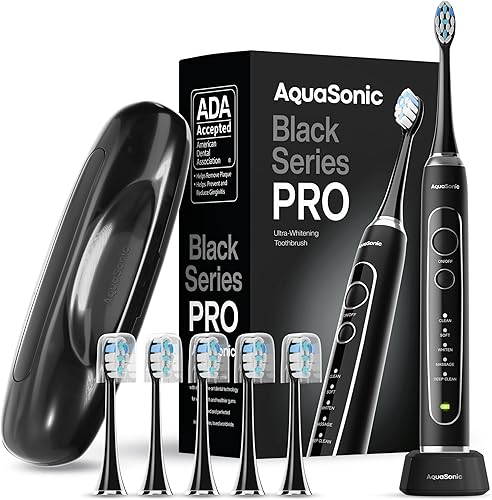
- Ergonomic satin-touch handle
- 5 modes
- Wireless charging
- Up to 30 days per charge
- 6 brush heads and travel case
The satin-touch handle and 5 modes give you several settings to consider. Six included brush heads reduce the need to shop for replacements right away.
Pros
- Six brush heads included
- Travel case and wireless charging base
- Up to 30 days per charge
Cons
- Five modes can add choices
- No pressure sensor is specified
The Aquasonic Black Series PRO includes a satin-touch handle, wireless charging base, travel case and 6 ProFlex brush heads. Its battery provides up to 30 days of use per charge.
Five modes are available: Clean, Soft, Whiten, Massage and Deep Clean. That range may suit someone who likes having options, though it means more settings to choose among than the simpler models here.
The handle is described as ergonomic and non-slip. No pressure sensor is specified, so choose another pick if pressure feedback is a must-have feature.
Consider it when included heads, a travel case and longer battery life matter most. Skip it if you rely on a pressure sensor or would rather have fewer modes to manage.
What makes a toothbrush easier for older hands?
A toothbrush is easier to manage when its grip, button, head and charging routine fit your hands and habits. The product descriptions do not provide handle circumference or button force, so a feature list cannot settle those comfort questions.
A pressure sensor can give feedback without requiring you to watch a screen. The Sonicare 5300 and Sonicare 4200 signal through vibrations, while Oral-B iO models provide light-based alerts; the Smart 1500 also has a visible pressure control.
A timer can reduce the need to keep track of brushing time. Look for a 2-minute timer and, if helpful, 30-second cues that prompt you to move to another part of your mouth.
Controls are personal. Some people may prefer the iO Simple Clean's one-touch start, while others may want the Sonicare 4200's three intensity choices or the 5300's range of modes and levels.
Head shape can also affect how familiar a brush feels. Oral-B models in this group have round heads, while Sonicare and SURI use an elongated shape; if you have a strong preference, consider that before buying.
Which toothbrush features should seniors compare first?
The best starting point is the part of brushing that feels least convenient: controlling pressure, keeping time, handling the brush or maintaining its charge. Choose one priority, then compare models that address it.
If brushing too hard is your concern, choose a model with a pressure sensor and a signal you can notice. Our guide to electric toothbrushes with pressure sensors compares more options with this feature.
If you want fewer charging interruptions, compare stated battery life and charger style. The SURI Core Sonic and Aquasonic Black Series PRO have longer stated intervals between charges than the Sonicare models here; their charging methods also differ.
Our guide to rechargeable electric toothbrushes covers battery and charging differences across models.
If you travel or want a case to keep items together, check whether the case is protective or can charge the brush. The ProtectiveClean 6500 includes a USB charging travel case, while other models include a travel case without a charging feature.
See our roundup of electric toothbrushes with travel cases.
Brush head fit matters for long-term use. Oral-B iO heads are distinct from the brand's other replacement heads, so check our guide to Oral-B replacement heads before stocking up.
How should you choose an electric toothbrush for arthritic hands?
For arthritic hands, prioritize a handle and control layout you can comfortably grip and operate. The product descriptions identify features such as lightweight construction or one-touch operation, but they do not give handle circumference or button force.
The SURI Core Sonic is described as lightweight, and the Oral-B iO Simple Clean uses a one-touch button that starts on super-sensitive. If possible, hold a handle in person and see whether you can reach the power button without changing your grip.
Think through the charging steps as well as the brushing steps. A charging base or travel case may be convenient, but you still need to place the handle securely and connect or position the charger.
If plugs or small parts are difficult to handle, choose a setup you can leave in a stable, accessible spot.
The brush head should feel manageable as it moves around your mouth. A round head may encourage a tooth-by-tooth approach, while an elongated head may feel closer to a manual brush.
Neither shape is a universal fit, so use your own comfort and dentist's advice.
How do you set up and care for a new electric toothbrush?
Start by putting the charger somewhere dry and easy to reach, then charge the handle according to its instructions before your first full routine. The Sonicare 4200 set includes a charger but no power adaptor, while the Aquasonic Black Series PRO uses a wireless charging base.
Attach a compatible brush head securely and choose the gentlest setting that feels comfortable. For the Sonicare 4200, Easy Start gradually raises power over the first 14 cleans; the iO Simple Clean starts on super-sensitive.
Use the timer to brush all areas of your mouth rather than pressing harder to finish quickly. Move from one quadrant to the next when the brush prompts you, and let the brush do the work with a light touch.
After brushing, rinse the head and handle as the care instructions direct, then store the brush so the head can dry between uses. Avoid putting a wet brush into a closed travel case for extended storage.
Keep a note of when you attach a new head if your handle does not remind you. BrushSync can provide a reminder on the Sonicare 5300 and ProtectiveClean 6500, while the iO Series 3 has a refill change alert.
What common electric toothbrush mistakes should you avoid?
Pressing harder is a common mistake, especially when changing from a manual brush. A pressure sensor can cue you to ease off, but the signal only helps if you respond by relaxing your grip.
Another mistake is brushing one area for too long and rushing through the rest. Use the 30-second prompts to move around your mouth, and let the 2-minute timer set the overall pace.
Do not choose a model only because it has the most modes. If you prefer a consistent routine, a simple start setting or a few intensity levels may be more useful than several named programs.
Check head compatibility before buying replacements. The Oral-B iO Simple Clean fits iO replacement heads, while other Oral-B handles use a different replacement-head family; see which Oral-B brush heads fit which handles if you are unsure.
A travel case is not always a charging case. Confirm the difference before a trip if you expect to recharge away from home, and bring the correct charger or power connection for your model.
Finally, do not keep using a worn brush head just because the handle still works. Follow the head maker's care guidance and use any replacement reminder as a prompt to check the bristles and replace the head when needed.
How did we compare these electric toothbrushes for seniors?
We compared the features against practical priorities for older hands: pressure feedback, clear timing cues, simple controls, battery life and included accessories. The picks serve different routines, so the best fit depends on which of those needs matters most to you.
Product descriptions do not tell you how a handle will feel in your hand, how easy a button is to press or whether a specific mode suits your teeth. Treat grip and controls as personal fit questions, and ask your dentist about oral-care needs that depend on your health.
Which electric toothbrush should seniors choose?
Choose the Sonicare 5300 if you want pressure feedback, adjustable modes and intensity, plus a travel case. Pick the Oral-B iO Simple Clean for one-touch operation, or the Sonicare 4200 if a gradual start and intensity adjustment sound easier to manage.
For a visible pressure warning, consider the Oral-B iO Series 3 or Smart 1500. Compare head shape, charging style and replacement-head fit before deciding, then see our pressure sensor toothbrush picks.
Our top 3 picks at a glance
-
1
-
2
-
3
Frequently asked questions
What should seniors look for in an electric toothbrush?
Start with the feature that would make brushing easier for you: pressure feedback, a timer, a button you can reach, or a charging setup that fits your bathroom. A pressure signal and quadrant timer can guide pace, while a lighter handle or one-touch start may suit some hands better.
If you have specific oral-care concerns, ask your dentist which brush head or setting fits your needs.
Are electric toothbrushes easier to use for arthritic hands?
They may reduce repeated manual brushing motions, but comfort depends on the handle, controls and brush head. The SURI Core Sonic is described as lightweight, while the Oral-B iO Simple Clean uses a one-touch button.
If possible, hold a handle before buying to see whether you can grip it and reach its button comfortably.
Do pressure sensors help older adults brush gently?
A pressure sensor alerts you when you press too hard, so you can ease off. The Sonicare 5300 and Sonicare 4200 signal through vibrations, while the Oral-B iO Series 3 uses a sensor alert and the iO Simple Clean slows down and signals red.
Follow your dentist's advice if you have specific gum concerns.
How often should an electric toothbrush head be replaced?
Follow the care instructions for your brush head and replace it when it is worn. The Oral-B iO Series 3 has a refill change alert, while Sonicare BrushSync models can remind you when a head needs replacing.
Replacement head types vary by handle, so check compatibility before buying extras.
Is a travel case useful for everyday storage?
A travel case keeps a toothbrush and its accessories together when you pack, but it may take space in a drawer or on a counter. A charging travel case, such as the one included with the Sonicare ProtectiveClean 6500, also offers a charging option on trips.
For bathroom storage ideas, see our guide to keeping an electric toothbrush clean and stored.