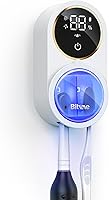
How to Charge an Oral-B iO Toothbrush
To charge an Oral-B iO toothbrush, place the handle on a base compatible with its model and follow that model's charging instructions. The MeaeJoto charger is compatible with iO2 through iO6, but not iO7 through iO10.
On this page (7 sections)
- How do you charge an Oral-B iO toothbrush?
- Which charger fits your Oral-B iO model?
- How can you tell if the toothbrush is charging?
- What should you check if the toothbrush won't charge?
- Is a replacement charger useful for travel?
- How should you care for the charger?
- How to charge an Oral-B iO toothbrush: what to remember
To charge an Oral-B iO toothbrush, place the handle on a base compatible with its model and follow that model's charging instructions. The MeaeJoto charger is compatible with iO2 through iO6, but not iO7 through iO10.
Use the charger supplied for your handle when available. If you need a replacement, check its compatibility with your exact model before using it.
How do you charge an Oral-B iO toothbrush?
Place the handle on a charger compatible with your iO model. Connect the base to a working outlet and follow your manual's charging instructions.
The handle should sit steadily on the base. If it wobbles or charging does not appear to start, lift it and reseat it.
Charging time and indicator behavior can vary by model. Check your manual for the expected charge time and light signals.
Which charger fits your Oral-B iO model?
Check compatibility with your exact iO series before using a replacement. The MeaeJoto charger is compatible with iO2 through iO6, among other Oral-B models, and excludes iO7 through iO10, Pulsonic, and Philips Sonicare brushes.
The North American two-pin plug matters when traveling. Check the outlet type at your destination and whether you'll need a plug adapter.
If your model falls outside the stated range, use a charger compatible with that handle. Our guide to the best Oral-B iO toothbrushes can help identify the series you own.
How can you tell if the toothbrush is charging?
Check the charging signal described in your model's manual. Light patterns can differ by handle, so consult the manual if you are unsure whether the brush is charging or fully charged.
Don't assume that every light means the same thing across iO models. See our guide to Oral-B iO toothbrush lights and what they mean for help interpreting a signal.
What should you check if the toothbrush won't charge?
Check the outlet, charger compatibility, handle position, and visible moisture or debris. These checks can help identify a connection problem.
- Test the outlet with another device.
- Confirm the base is compatible with your iO series.
- Lift and reseat the handle on the base.
- Check the contact area for moisture or debris, then follow your manual's cleaning directions.
- Check for the charging signal described in your manual.
Don't force the handle onto a base that does not fit. For more steps, read why an Oral-B iO toothbrush may not charge.
Is a replacement charger useful for travel?
A spare charger can help if your trip is longer than your handle's available charge. Choose one compatible with your iO model and the outlets at your destination.
The MeaeJoto charger has a 100–240V input range and a North American two-pin plug. Check whether you'll need a plug adapter, and see our electric toothbrush travel case guide for ways to pack the handle.
How should you care for the charger?
Follow the care directions for your charger and keep the outlet and plug dry. Unplug the base before cleaning, and don't immerse or rinse it unless its instructions allow that.
The MeaeJoto charger is described as waterproof, but keep its outlet and plug dry. Don't use a charger with visible damage.
For bathroom storage ideas, see how to store an electric toothbrush in the bathroom. A dry, stable spot also makes it easier to place the handle on its base.
How to charge an Oral-B iO toothbrush: what to remember
Use a charger compatible with your iO model and follow the charging instructions in its manual. The MeaeJoto charger fits iO2 through iO6, but not later iO series.
If your brush still won't charge after checking the outlet and handle placement, follow the troubleshooting steps for an Oral-B iO toothbrush that is not charging.
Frequently asked questions
How do you charge an Oral-B iO toothbrush?
Place the handle on a charger compatible with your iO model and follow its charging instructions. Check that the handle is seated on the base and that the base is connected to power.
Can I use any Oral-B charger for an iO toothbrush?
No. Check compatibility with your exact iO model before using a replacement charger.
The MeaeJoto charger is listed as compatible with iO2 through iO6, but not iO7 through iO10.
Can an Oral-B iO toothbrush stay on its charger?
Follow the charging and care directions for your specific iO model. Keep the base and outlet dry, and consult the manual if you have questions about storage or charging.
Why is my Oral-B iO toothbrush not charging?
Check that the outlet works, the charger matches your iO model, and the handle sits correctly on the base. If it still won't charge, follow your manual's guidance and see our guide to an Oral-B iO toothbrush that is not charging.