Why Is My Oral-B iO Toothbrush Not Charging?
If your Oral-B iO toothbrush is not charging, check the outlet, seat the brush on a charger compatible with your exact model, and watch the charging indicator. If it still shows no sign of charging, confirm the handle and charger models before replacing either.
On this page (7 sections)
- Why is my Oral-B iO toothbrush not charging?
- What should you check when the Oral-B iO charging light is off?
- Can an Oral-B iO2 have charging problems?
- When should you replace the charger or contact support?
- How can you prevent charging trouble while traveling?
- What mistakes can keep an Oral-B iO from charging?
- What should you do if your Oral-B iO still will not charge?
If your Oral-B iO toothbrush is not charging, check the outlet, charger fit, and model compatibility before replacing anything. A base can look right yet be incompatible with your handle, so identify the iO series first.
Try a known working outlet, place the brush upright and centered on its base, and check the indicator behavior in your handle’s manual. For model-specific charging steps, see how to charge an Oral-B iO toothbrush.
Why is my Oral-B iO toothbrush not charging?
Start with the outlet, then the brush position and charger compatibility. These checks help narrow down whether the problem is in the power source, the setup, or the hardware.
- Plug another small device into the outlet to confirm it has power.
- Make sure the charger is firmly plugged in and sits on a dry, stable surface.
- Lift the brush, then place it upright and centered on the charging base.
- Check the handle model against the charger’s compatibility information.
- Watch for an indicator, then compare its behavior with the manual for your handle.
Keep electrical parts away from water, and stop using any charger with a damaged cord or plug. Don’t open the handle or charger.
Does your Oral-B iO charger match your model?
Match the charger to the exact iO series on your handle or packaging. A base that works with another Oral-B model may not charge your iO.
The MeaeJoto Oral-B Charger is compatible with iO2, iO3, iO4, iO5, and iO6. It does not work with iO7, iO8, iO9, or iO10.
Choose this charger if your handle is in its compatible range and you want a compact plug-in base. Skip it if you have an iO7 through iO10, a Pulsonic brush, or a Philips Sonicare handle.
Its Type A plug is designed for North American outlets, so check plug shape as well as voltage compatibility when traveling.
Is the charger getting power from the outlet?
Try another working outlet before treating the brush or charger as faulty. If the charger still shows no response across working outlets, continue with the placement and compatibility checks.
Keep the outlet and charger dry while checking them. Use an adapter or extension only if the charger’s instructions allow it, and don’t force a plug into a socket.
If the outlet works but the brush shows no charging sign, confirm the model and position. Our guide to Oral-B iO charging lights explains how to interpret common light behaviors.
What should you check when the Oral-B iO charging light is off?
An unlit indicator alone cannot identify whether the outlet, charger, or handle is at fault. Confirm power and compatibility, then consult the manual for your specific indicator behavior.
Place the handle upright on the center of the base. Wipe the brush and base with a dry cloth if residue is in the way, and check that nothing is wedged between them.
Don’t scrape or wet the charger contacts. If cleaning and repositioning change nothing, use the model-specific manual or contact Oral-B support.
What if the Oral-B iO charging light flashes?
Use the manual for your handle to identify a flashing pattern. Note the color and whether it changes when you lift the brush from the base, then compare those details with our Oral-B iO toothbrush lights guide.
If the handle also seems frozen or unresponsive, how to reset an Oral-B iO toothbrush covers a separate troubleshooting step. A reset cannot fix a dead outlet or an incompatible charger.
Can an Oral-B iO2 have charging problems?
Yes, an iO2 can have outlet, placement, or compatibility problems like other iO models. Confirm the charger includes iO2 in its compatible models before buying a replacement.
The MeaeJoto charger works with iO2, but it does not fit every Oral-B handle. Check the full model number and compatibility notes rather than relying on a similar shape or brand name.
If the brush still will not charge after the basic checks, contact Oral-B support for model-specific help. Avoid trying chargers at random when compatibility is unclear.
When should you replace the charger or contact support?
Replace a charger after checking the outlet and confirming it matches your handle. If those checks don’t explain the problem, ask Oral-B support whether the charger or handle needs attention.
A replacement base may help when the original is damaged or no longer works, but it won’t fix a dead outlet or an incompatible model. If the handle has stopped working in other ways, how to reset an Oral-B iO toothbrush covers another troubleshooting option.
Which Oral-B iO handles suit a replacement charger?
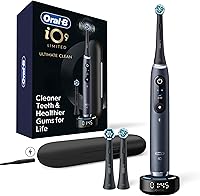
Choose a replacement handle by the features you’ll use, then confirm its charger and your bathroom setup. The iO Series 3 suits people who want three modes, a pressure sensor, two replacement heads, and a travel case.
The iO Simple Clean is a simpler fit for someone moving to an electric brush: it starts on the super-sensitive setting and has three settings, a pressure sensor, and a low-charge indicator. Skip it if you need features beyond those modes or want to choose a charger separately without checking the included setup.
Before choosing either brush, confirm which charger comes with the exact model and whether it matches your current setup. Compare models in our guide to the best Oral-B iO toothbrushes.
How can you prevent charging trouble while traveling?
Pack the charger that matches your handle and protect it from moisture and damage. If you plan to use a different base at your destination, verify compatibility before leaving.
The MeaeJoto charger accepts 100–240V input, which can help when traveling between regions with different voltage. It has a Type A plug, however, and its model compatibility still excludes iO7 through iO10.
Check both voltage and plug shape for your destination.
For a tidy charging spot at home, follow how to store an electric toothbrush in the bathroom. Keep the base away from splashes and clean it only as its instructions allow.
What mistakes can keep an Oral-B iO from charging?
The most common avoidable mistake is buying a charger based on brand alone instead of the exact model. Check the series, plug type, and setup instructions before assuming a replacement will work.
Other mistakes include testing a charger in an outlet that has no power, placing the brush off-center, and interpreting a dark or flashing light without checking the handle’s manual. Don’t force the handle onto the base or use a damaged charger.
Keep a note of the handle model and indicator pattern if you contact Oral-B support. Those details make it easier to explain what you already checked.
What should you do if your Oral-B iO still will not charge?
For an Oral-B iO toothbrush not charging, test the outlet, reseat the handle, and verify the charger matches the exact series. If the problem continues, contact Oral-B support with the model number and the light behavior you observed.
Choose the MeaeJoto charger only for a compatible iO2 through iO6 handle and a suitable Type A outlet. If the brush itself needs replacing, choose the iO Series 3 for its three modes and included travel case, or the Simple Clean for a gentler starting setting and low-charge indicator.
For charging steps, start with how to charge an Oral-B iO toothbrush.
What do you need to know about an Oral-B iO toothbrush not charging?
A replacement charger must match your brush model as well as your routine. Check the power source first, seat the handle correctly, and use the manual or support if the indicator remains unclear.
- Outlet: Confirm it works with another device.
- Placement: Seat the handle upright and centered.
- Compatibility: Match the charger to the exact iO series.
- Next step: Contact Oral-B support if the brush still will not charge.
Frequently asked questions
Why is my Oral-B iO toothbrush not charging?
The outlet, charger, brush position, or model compatibility may be the cause. Check the outlet with another device, then place the brush upright on a charger compatible with your iO model.
If the charging light stays off, confirm the charger matches your exact handle and contact Oral-B support before buying a replacement.
Can I use any Oral-B charger with an iO toothbrush?
No. Charger compatibility depends on the iO series.
The MeaeJoto charger is compatible with iO2 through iO6 and is not compatible with iO7 through iO10.
Confirm your exact model before choosing a charger.
What does it mean if my Oral-B iO charging light is off?
An unlit indicator alone does not identify the cause. Check the outlet, make sure the handle is seated on a compatible charger, and look at your model's manual for its light behavior.
For help interpreting the indicator, see our guide to Oral-B iO toothbrush lights.
Should I leave my Oral-B iO toothbrush on the charger?
Follow the care instructions for your exact Oral-B iO model and charger. If the brush is not gaining charge, first confirm that the outlet works and the charger matches the handle.
Leaving a brush on an incompatible charger will not solve a compatibility problem.